Introducing third-party payments to the Hubtiger suite

Great news, Hubtiger community! We're thrilled to announce the rollout of our latest feature: Third-Party Payments. As the name suggests, this latest feature is specially designed to help shop owners seamlessly manage their interactions and payments with external partners. Think about those moments when you're dealing with external parties like insurance companies or manufacturer warranty claims – the kind of stuff that can get a bit intricate.
Imagine this: Your customer spots a fault on their brand-new bike, and the manufacturer steps in to handle the replacement. Alternatively, they've landed a fantastic deal that includes servicing, with a third party shouldering the payment.
That’s where Hubtiger’s Third-Party payments feature steps in to streamline communication and collaboration by allowing you to effortlessly set up third parties, tailor notification triggers, and delegate payment responsibilities.
The key benefits of the third-party payments feature include:
- Minimise the manual communication efforts by automating notifications, saving time for both shop owners and third parties.
- Adapt Hubtiger to your unique business needs with configurable triggers and payment responsibilities.
- Strengthen partnerships with third parties through clear and timely communication, fostering a collaborative and productive environment.
- Streamline your financial processes by assigning specific payment responsibilities, reducing ambiguity and ensuring accurate accounting.
How To Use Third Party Payments
Step 1: Navigate to third-parties settings
To use the Third-Party Payments feature, start by logging into your Workshop and heading to the ‘Settings’ section.

Step 2: Add a new entity
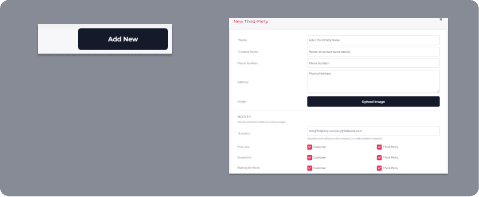
Within the ‘Settings’ section, locate the ‘Third-Parties’ card and click on ‘Add New’. This is where you can set up a new third-party entity and choose whether the customer and third party should receive automated communication notifications.
Step 3: Select appropriate party for each transaction
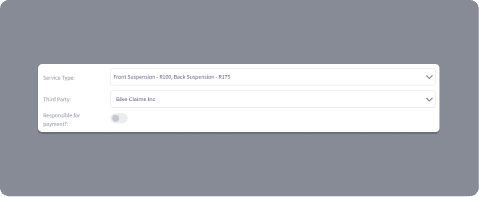
Once you've completed the setup in ‘Third Parties’, you'll find the option to choose the responsible third party in a drop-down menu on your booking card. You can easily select the appropriate party for each transaction using this menu.
Let’s Make Running Your Business Easier
You may like

How to create a refund policy that protects your business and builds trust
A clear refund policy is one of the simplest ways to protect your shop and build customer trust. According to recent data from Loop, 96% of U.S. consumers say a retailer’s return policy shows how much the brand cares about its customers.

Are you using coupon codes to their full potential in your shop?
Running a rental or repair shop means constantly finding new ways to delight customers, fill quiet spots, and keep revenue growing. One simple yet effective way to do this is by using coupon codes more strategically.