
Repair management software
Built for repair shop owners who are ready to get out of the weeds

Your technicians know what job is next
Your customers are kept up to date
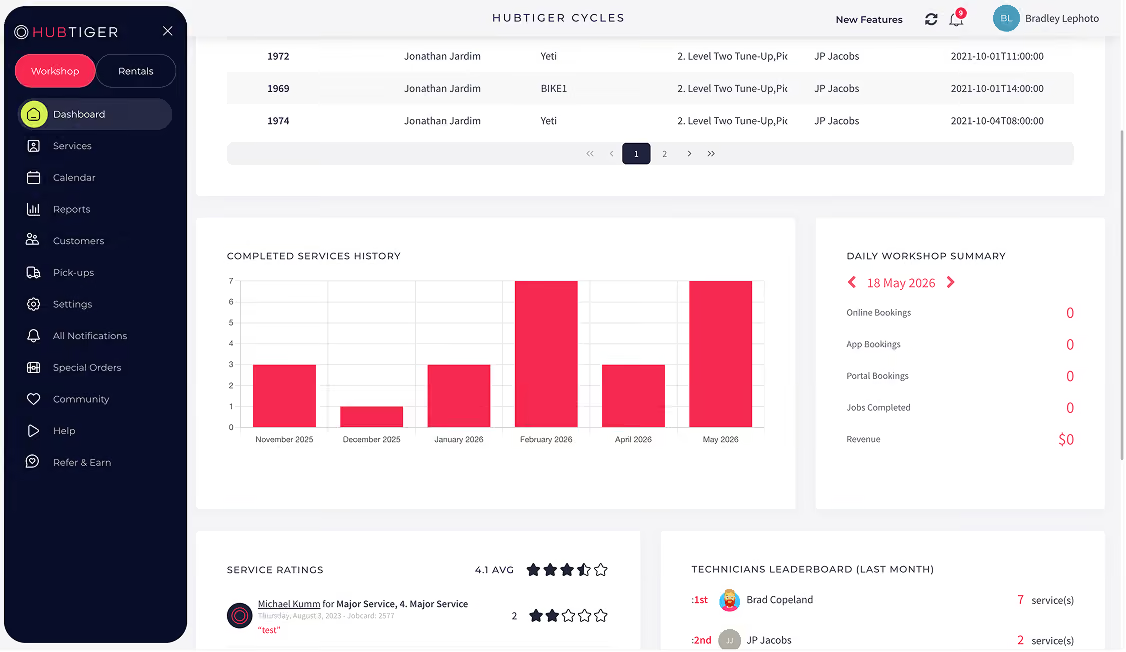
You have a clear view of how your shop is actually performing
Trusted by







using Hubtiger
Everything your repair shop needs, in one place
Every feature of Hubtiger’s repair management software is designed to take something off your team's plate and give you back time where it matters most.

Online repair scheduling
Customers schedule their own repairs through your website, and every detail lands straight in your calendar.

Digital work order
Every repair has a digital work order with a clear status and an assigned technician so everyone always knows what needs doing and what's already done.

Automated customer communication
Send your customers updates at every stage of the repair, by email, SMS, or WhatsApp, so they stay informed and your team stays focused on the repairs.

Repair quotes and invoicing
Build quotes and invoices directly from the work order, with parts and labor pricing pulled from your POS system, and send them to your customer for approval with one click.

Productivity tracking
Log time against every repair and compare it to your estimate so your technicians work to a clear target and your pricing reflects the actual work involved.

Repair shop reporting
Get a clear view of revenue, job volume, technician performance, and service types so every business decision is backed by data, not instinct.
Watch a demo to see how it all comes together
Watch demoA smoother repair experience, from drop-off to collection
From the moment a customer schedules a repair to the moment they pick it up, Hubtiger’s repair management software is built around how your shop actually works.
Job intake
Service and repair jobs are scheduled online or created manually for walk-ins - either way, every job appears in your repair calendar with all the details captured upfront.
Job coordination
Your technician opens the digital work order, sees everything they need, and gets to work. A quote is built on the work order, with parts and prices pulled from your POS, and sent to the customer for approval before any work continues.
Customer communication
At every stage of the repair, your customer receives an automatic update by email, SMS, or WhatsApp - so they always know where their item stands with no manual follow-up needed from your team.
Collection and payment
Once the repair is done, your customer is notified, the job is sent to your POS for payment, and closed out with a full service record kept.
Integrates with the tools you already use
Hubtiger integrates with leading point-of-sale systems, payment gateways, and messaging tools so your existing setup and your repair operations work together from day one.
View all integrations








What our customers are saying
Over 2000 shop owners, managers, and technicians trust Hubtiger to keep their repairs on track.

If you're looking to offer your customers a premium experience with superior back-end support, there is only one option available. Business is booming, and we use your software daily. Big fans here! Thank you, Hubtiger, we could not have launched and grown our eBike business without your support.
At Fettle, we believe in a brilliant, modern customer experience for cyclists and wanted a solution that made life easy for riders and mechanics alike. Not only does Hubtiger make it simple for cyclists to book a service, but it enables us to provide a great experience once their trusted bike is in one of our workshops.

We are constantly pushing boundaries to provide a top-level experience for our customers to ensure their bikes are in peak condition. With Hubtiger, we can monitor usage and service history of our customers' bikes, down to each component.
Try Hubtiger free for 7 days
Full access to every feature. No credit card required. And if you’d like a guided walkthrough first, our team is happy to help.
Frequently asked questions
If you can't find what you're looking for here, our team is available on live chat.
Yes. Each Hubtiger plan includes a scheduling widget you can add directly to your website. Your customers are able to select their service, choose an available date & time, and the booking goes straight in your repair calendar with every detail already captured.
No. You can use Hubtiger for repairs only, rentals only, or both. It's entirely up to you. If your business grows into the other area down the line, adding it is straightforward.
Pricing depends on which solution you use. Repair software is priced based on the number of technicians in your shop.Rental software is priced based on the number of items in your inventory.
Every plan includes full access to all features. You can view our plans on the pricing page.
Hubtiger integrates with many leading POS systems. You can view all our integrations on the integrations page. If you don't have a POS, you can upload your product list using a simple Excel template.
Yes. You get full access to every feature during your 7-day free trial. No credit card required. If you'd prefer a guided walkthrough first, you can book a demo with our team.
Yes. Hubtiger records every repair job against the customer and their item. Next time they come in, your technician can see exactly what work has been done, which parts were used, and when the last service was completed.




