
Rental shop software
Run your rental business with confidence

Control from reservation to return
Visibility into every item
Insights to grow your rental business

Trusted by







tracked
Every part of your rental business, managed from one place
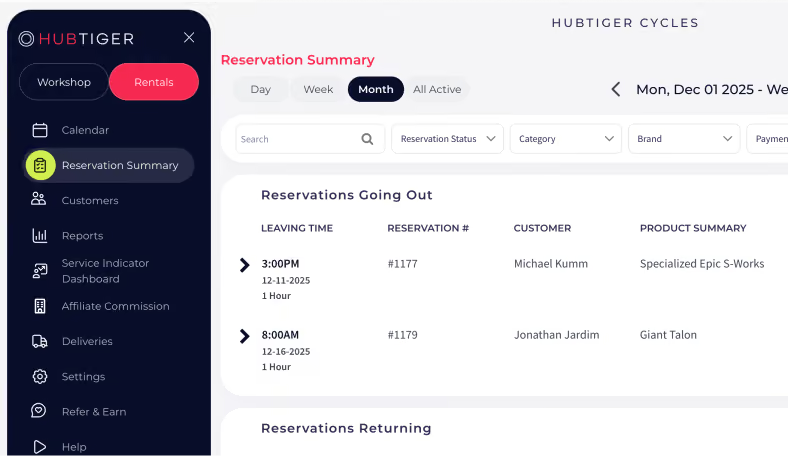
From reservation to return, Hubtiger’s rental shop software gives you control and visibility into your rental business.

Online rental reservations
Customers browse your available rental items and reserve directly through your website (day or night) and every reservation updates in your rental calendar.

Digital rental waivers
Your customers sign their rental waiver online or at the counter, and it's automatically stored against the booking.

Deposits and upfront payments
Collect a deposit or full payment at booking to reduce no-shows and have a fallback if an item comes back damaged.

Automated customer communication
Automatically send booking confirmations, pick-up reminders, and return instructions by email, SMS, or WhatsApp.

Rental reporting
Track rental revenue, availability, and demand across your inventory so every decision you make is grounded in data.

Service indicator
Set maintenance rules for each item and get reminded when it's due for servicing so nothing goes out in a condition it shouldn't.
Watch a demo to see how it all comes together
Watch demoA rental experience your customers will come back for
From the moment a customer reserves an item to the moment they return it, Hubtiger’s rental management software is built around the way your rental shop actually works.
Rental reservation
Every reservation lands in your calendar with the customer details, item, and rental period already captured. Whether it comes in online or over the counter, you don't enter anything twice.
Item preparation
Your team sees exactly what's been booked and when. Your team checks, preps, and has every item ready before the customer arrives. A reminder goes out automatically so your customer knows exactly when and where to collect.
Handover
Your customer signs their digital waiver at the counter or in advance. You hand over the item with everything recorded against the booking before they walk out the door.
Return
When the item comes back, your team logs the condition and notes any damage. Your team processes final charges through your POS and closes the rental, keeping a full record. A review request goes out automatically to capture the customer's feedback while the experience is still fresh.
Integrates with the tools you already use
Hubtiger integrates with leading point-of-sale systems, payment gateways, and messaging tools so your existing setup and your rental operations work together from day one.
View all integrations








What our customers are saying
Over 2000 shop owners and their teams trust Hubtiger to keep their rentals running smoothly.

If you're looking to offer your customers a premium experience with superior back-end support, there is only one option available. Business is booming, and we use your software daily. Big fans here! Thank you, Hubtiger, we could not have launched and grown our eBike business without your support.
"Hubtiger has completely transformed the way we manage rentals. What used to take time and manual effort is now fast, seamless, and professional for both our team and our customers. It gives us the confidence and efficiency of a much larger operation, while allowing us to focus on what really matters: delivering an exceptional cycling experience in Mallorca."

"The software has significantly reduced admin time, improved the efficiency of loan management, and ensured bikes are returned on schedule. The real-time availability dashboard and automated booking confirmations are essential in preventing double bookings and improving service reliability."

Try Hubtiger free for 7 days
Full access to every feature. No credit card required. And if you'd like a guided walkthrough of our rental software first, our team is happy to help.
Frequently asked questions
If you can't find what you're looking for here, our team is available on live chat.
Yes. Whether a customer books through your website or walks in off the street, every reservation lands in the same rental calendar with all the details captured. Your team always works from one view, regardless of how the booking came in.
No. You can use Hubtiger for repairs only, rentals only, or both. It's entirely up to you. If your business grows into the other area down the line, adding it is straightforward.
Yes. If you operate more than one location, you can track exactly where every item is at any given time. When an item moves between locations, your team records it in Hubtiger and availability stays accurate across all your stores.
You can collect a deposit or full payment at booking through Stripe. If an item comes back damaged, you can raise the charge directly from the rental record.
Pricing depends on which solution you use. Repair software is priced based on the number of technicians in your shop.Rental software is priced based on the number of items in your inventory.
Every plan includes full access to all features. You can view our plans on the pricing page.




